

I keep seeing posts about how to use Claude, what belongs in your CLAUDE.md, and opinionated setups for agentic coding workflows. I’m deep in that world too. But the thing that actually changed my day-to-day workflow this year isn’t an AI tool. It’s a git feature from July 2015.
git worktree shipped in Git 2.5. It’s been there for over a decade. I’d heard of it, skimmed a blog post or two, and moved on every time. It felt like a niche power-user thing I didn’t need.
I was wrong. It’s the most underrated feature in git, and once I wrapped it in a small shell function, it eliminated more daily friction than anything else I’ve adopted this year.
This post covers what worktrees are, why the raw commands never stuck for me, and how I built a single command called gw that makes the whole workflow effortless.
The Tax
You probably do this multiple times a day:
You’re deep in a feature branch
Someone asks you to review a PR, or a bug comes in, or you need to check something on main
You stop what you’re doing
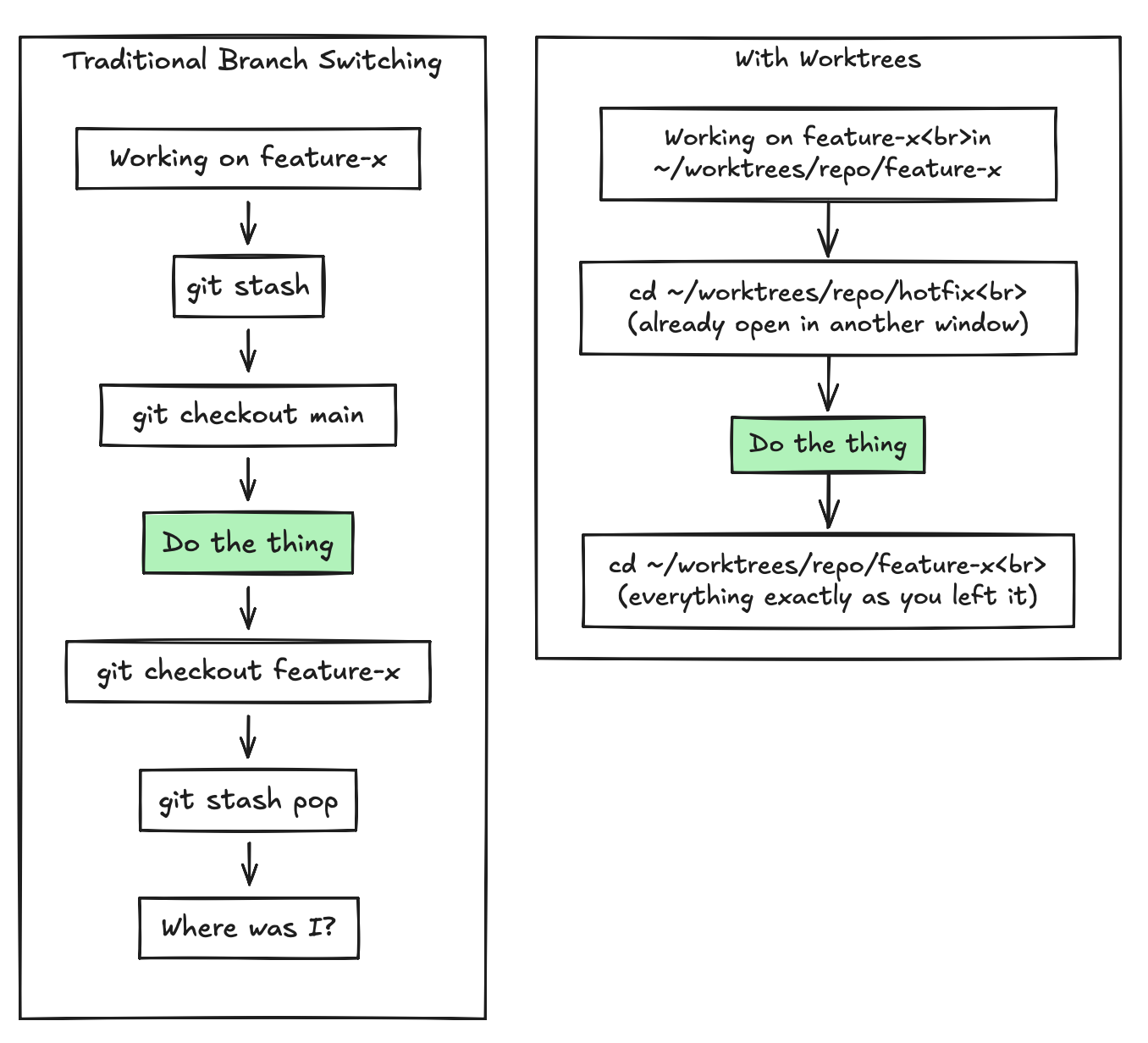
git stash(or worse, a WIP commit you’ll forget about)git checkout other-branchWait for your editor to reload, your dev server to restart, maybe a fresh
npm installDo the thing
git checkout original-branchgit stash popTry to remember where you were
Every step is small. But the compound cost is real. You lose flow state. You lose the mental model of the code you were editing. And if you’re juggling three branches — a feature, a hotfix, and a review — the tax multiplies.
What Git Worktrees Actually Are
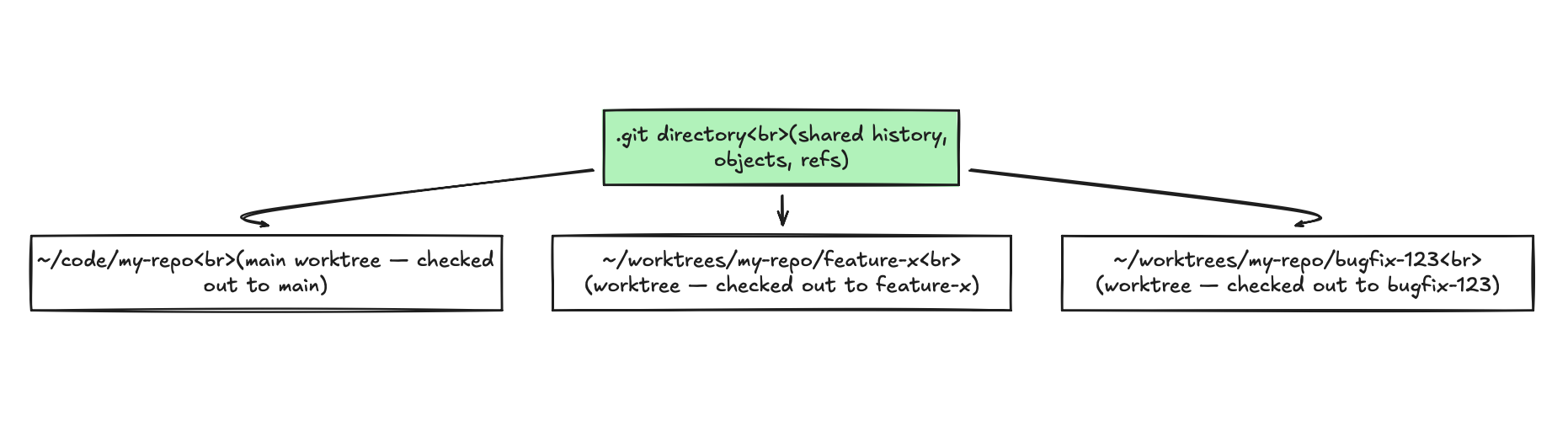
A worktree is an additional working directory linked to your existing repository. Each worktree checks out a different branch, but they all share the same .git data — the same history, the same remotes, the same objects.
Think of it this way: normally your repo has one working directory and one checked-out branch. Worktrees let you have multiple working directories, each with its own branch, all backed by a single repo.
The basic commands:
# CREATE A WORKTREE — checks out 'feature-x' in a new directory
git worktree add ../feature-x feature-x

# LIST ALL WORKTREES — shows the main repo and all linked worktrees
git worktree list

# REMOVE A WORKTREE — cleans up when you're done
git worktree remove ../feature-x
What makes this powerful:
No stashing. Each worktree has its own working tree and index. Your uncommitted changes in one worktree don’t affect another.
No teardown when switching back. A brand-new worktree still needs its own
npm install, build cache, and.envsetup. But once a worktree is initialized, itsnode_modules, artifacts, and dev server stay in that directory while you work in another one.No context switching. You can have three editor windows open on three branches simultaneously.
Cheap. Worktrees share the
.gitdirectory. They don’t clone the full repo. Creating one takes milliseconds.
One constraint to know: a branch can only be checked out in one worktree at a time. If feature-x is checked out somewhere, you can’t check it out in a second worktree. Git enforces this to prevent conflicting changes to the same branch.
Being Lazy (Until Now)
I’d known about worktrees for years. So why didn’t I use them?
My main issue was that the raw workflow has too many steps and too much typing:
# STEP 1: Fetch latest from origin
git fetch origin

# STEP 2: Figure out if the default branch is 'main' or 'master'
#         (varies by repo)

# STEP 3: Decide where on disk this worktree should live
#         (no convention — you pick a path every time)

# STEP 4: Create the worktree based off the latest default branch
git worktree add -b feature-x /some/path/feature-x origin/main

# STEP 5: cd into the new directory
cd /some/path/feature-x

# STEP 6: Open your editor
cursor .
What Helped
I wrote a shell function called gw (short for git worktree). It does everything above in one command:
gw feature-x
That single command:
Fetches all remotes (
git fetch --all --prune)Detects the default branch (
master/main) automaticallyCreates the worktree at
~/worktrees/<project-name>/<branch-name>If the branch exists on remote, checks it out with tracking
If the branch is new, creates it from
origin/<default-branch>(or from the current branch withc)Opens the worktree in your editor
Here’s the full script:
# GIT WORKTREE HELPER — add to ~/.zshrc or ~/.bashrc
gw() {
  if [[ -z "$1" ]]; then
    echo "Usage: gw <branch-name> [-c|--current]"
    echo ""
    echo "Creates a git worktree for the given branch and opens it in Cursor."
    echo "  If branch exists on remote: checks it out into a worktree."
    echo "  If branch is new: creates it from master/main (default) or current branch (-c)."
    return 1
  fi

  local branch="$1"
  local from_current=false
  shift

  while [[ $# -gt 0 ]]; do
    case "$1" in
      -c|--current) from_current=true; shift ;;
      *) echo "Unknown option: $1"; return 1 ;;
    esac
  done

  local repo_root
  repo_root=$(git rev-parse --show-toplevel 2>/dev/null) || {
    echo "Error: not inside a git repository"
    return 1
  }

  local project_name
  project_name=$(basename "$repo_root")
  local WORKTREE_BASE="$HOME/worktrees"
  local wt_path="$WORKTREE_BASE/$project_name/$branch"

  # IF WORKTREE ALREADY EXISTS, JUST OPEN IT
  if [[ -d "$wt_path" ]]; then
    echo "Worktree already exists at $wt_path"
    cursor "$wt_path"
    return 0
  fi

  # FETCH ALL REMOTES
  echo "Fetching all remote branches..."
  git fetch --all --prune || {
    echo "Error: git fetch failed"
    return 1
  }

  # AUTO-DETECT DEFAULT BRANCH (master OR main)
  local default_branch
  default_branch=$(git symbolic-ref refs/remotes/origin/HEAD 2>/dev/null | sed 's@^refs/remotes/origin/@@')
  if [[ -z "$default_branch" ]]; then
    if git show-ref --verify --quiet refs/remotes/origin/master; then
      default_branch="master"
    elif git show-ref --verify --quiet refs/remotes/origin/main; then
      default_branch="main"
    else
      echo "Error: could not determine default branch (no master or main found)"
      return 1
    fi
  fi

  mkdir -p "$WORKTREE_BASE/$project_name"

  # CHECK IF BRANCH EXISTS ON REMOTE
  if git show-ref --verify --quiet "refs/remotes/origin/$branch"; then
    echo "Branch '$branch' found on remote. Creating worktree..."
    if git show-ref --verify --quiet "refs/heads/$branch"; then
      # LOCAL BRANCH EXISTS — use it directly
      git worktree add "$wt_path" "$branch"
    else
      # NO LOCAL BRANCH — create one tracking the remote
      git worktree add --track -b "$branch" "$wt_path" "origin/$branch"
    fi
  else
    # BRANCH IS NEW — create from default branch or current
    local base_ref
    if $from_current; then
      base_ref="HEAD"
      echo "Creating new branch '$branch' from current branch ($(git branch --show-current))..."
    else
      base_ref="origin/$default_branch"
      echo "Creating new branch '$branch' from $default_branch..."
    fi

    git worktree add -b "$branch" "$wt_path" "$base_ref"
  fi

  if [[ $? -eq 0 ]]; then
    echo "Worktree ready at $wt_path"
    cursor "$wt_path"
  else
    echo "Error: failed to create worktree"
    return 1
  fi
}
Practical Usage
Common patterns
# START A NEW FEATURE — branches from origin/main (or master)
gw feature-auth

# START A BRANCH FROM YOUR CURRENT WORK — useful for stacked PRs
gw feature-auth-v2 -c

# REOPEN AN EXISTING WORKTREE — skips creation, just opens the editor
gw feature-auth
Directory structure
~/worktrees/
  └── my-repo/
      ├── feature-auth/
      ├── fix-bug-123/
      └── ...
Each project gets its own subdirectory, so worktrees from different repos stay separate.
Anyway!
The script is intentionally simple. Here’s what you might want to change:
Editor: replace
cursor "$wt_path"withcode,nvim,zed, or whatever you use.Base path: change
$HOME/worktreesif you prefer a different location.Shell: the function works in both zsh and bash. Add it to
~/.zshrcor~/.bashrc, then runsource ~/.zshrc(or~/.bashrc) to load it.